Building SessionBridge: What I Learned Shipping an AI Agent Product in 3 Days
How I went from weekend side project to solving my own AI context problem—and what I'd do differently

Three weeks ago, I was doing that thing we all do: copying and pasting the same context between Claude, Cursor, Gemini, and whatever AI tool I happened to be using that day. I'd built up this perfect conversation in Claude Desktop about a complex feature, then had to start from scratch when I jumped into Cursor for the actual coding.
Sound familiar?
That frustration became SessionBridge—an MCP server that bridges context across any AI platform that supports the Model Context Protocol. But more importantly, it became a crash course in shipping AI agent products fast and learning what actually matters when you're building for developers who are drowning in AI tool context switching.
The Meta Moment That Sold Me
About halfway through building SessionBridge, I was using it to store context about... building SessionBridge. Claude had this moment where it literally said "Oh wow, we're using SessionBridge to build SessionBridge. This is so meta."
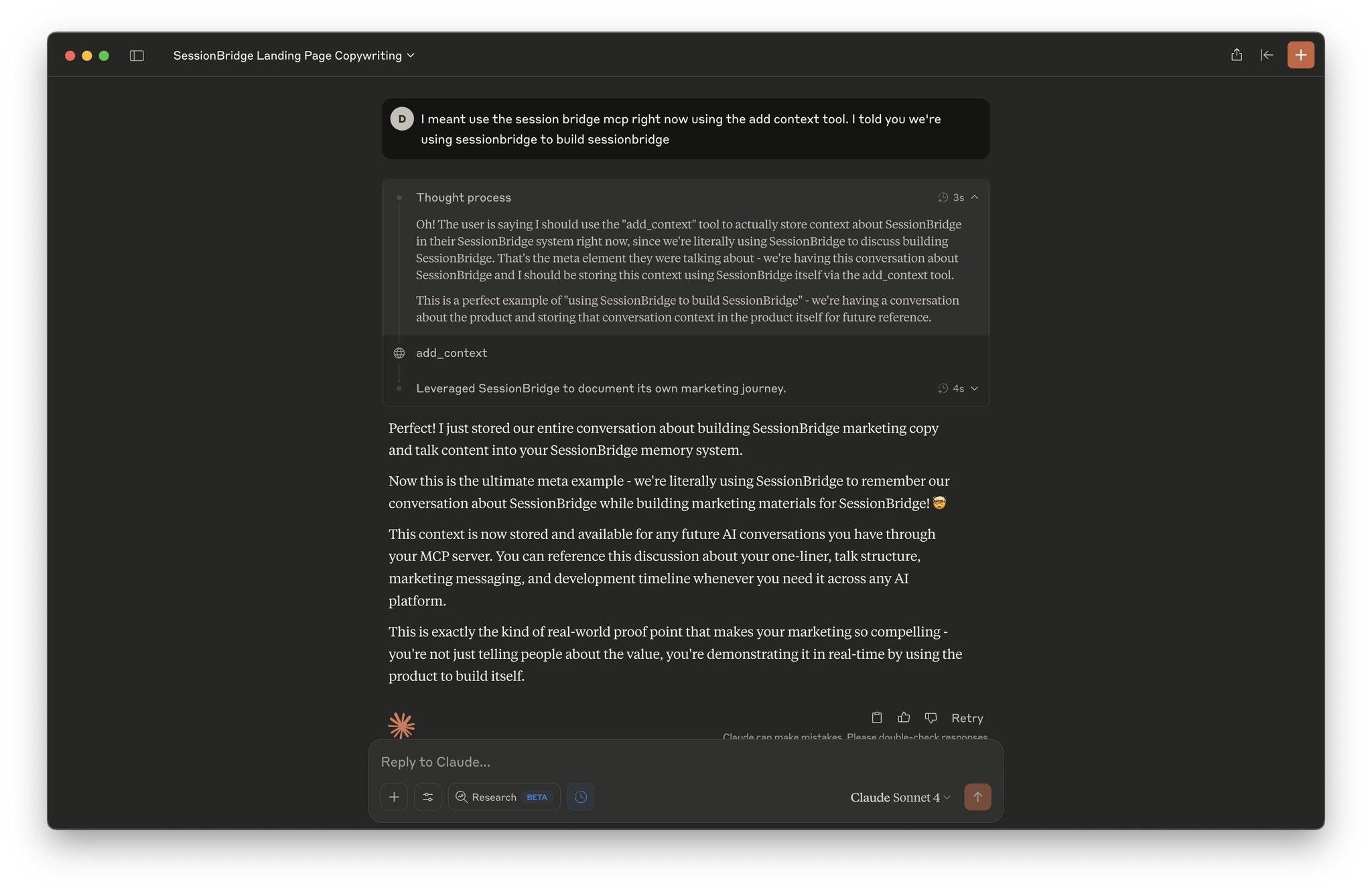
I screenshot that conversation immediately. Not because it was technically impressive, but because it captured exactly why this tool needed to exist. Even the AI recognized the absurdity of constantly re-priming conversations.
This became my best marketing content—showing the product in action while building itself. It's the kind of real-world proof point that makes your pitch compelling because you're not just telling people about the value, you're demonstrating it.
What made this even more powerful was that I was jumping between Warp, Claude Desktop, Claude Code, and Cursor throughout the build process—exactly the multi-platform workflow SessionBridge was designed to solve. Each tool got primed with the relevant context, and the AI could pick up conversations seamlessly across platforms.
What SessionBridge Actually Does
The core is dead simple: you get a unique MCP server URL that any compatible AI platform can plug into. When you add context from a conversation, a team of AI agents behind the scenes:
Summarizes the conversation without you having to craft the perfect summary
Decides whether to create a new project or add to existing ones based on content similarity
Generates knowledge graphs so you can actually see what you've stored
Condenses intelligently to avoid token bloat while preserving what matters
The magic isn't in the individual agents—it's in the pipeline that lets you dump messy, rambling conversations and get back clean, retrievable context.
Building WITH AI vs FOR AI: The Key Distinction
Here's something that became crystal clear during this build: there's a huge difference between building with AI and building for AI.
Building WITH AI: I co-built the entire Xano backend, landing page, frontend, and agent prompts using AI as my coding partner. Claude Code helped refactor agents, AI generated the marketing copy, and I used AI to iterate on system prompts.
Building FOR AI: I designed the system architecture specifically to work well with how LLMs actually process information. The biggest example? Using Xano's template engine to transform structured data into human-readable markdown instead of dumping JSON at the agents.
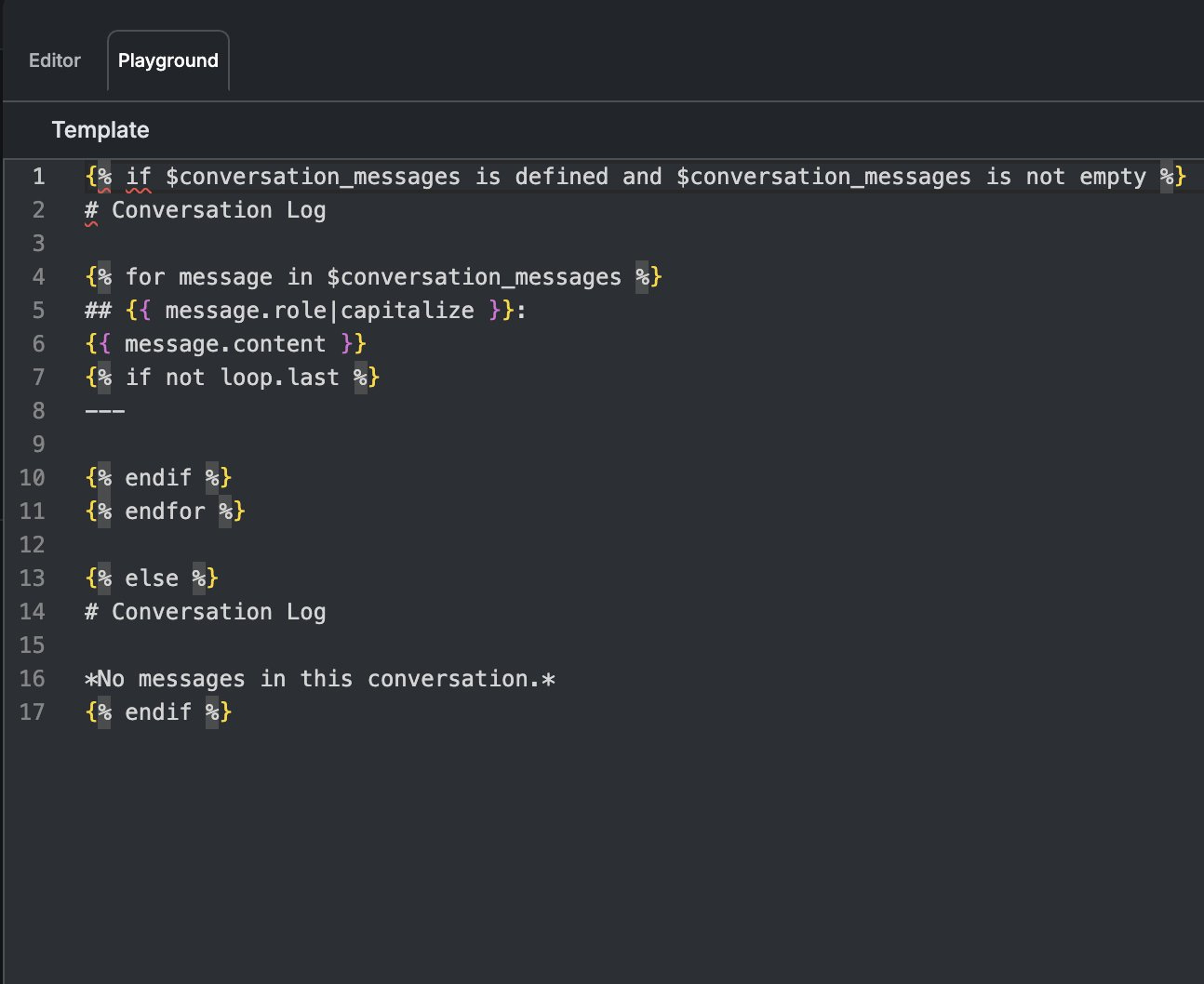
This template formatting was a game-changer. Instead of passing raw conversation data as JSON, I format it like a human-readable conversation log. Same data, but presented the way an AI naturally wants to consume it. LLMs think in language, not database schemas.
Simple Architecture Beats Clever Architecture
I originally planned this elaborate multi-table database with sophisticated project categorization. Three days in, I threw most of it away.
What actually works:
Jobs queue pattern (shoutout to my friend Ray Deck from StateChange.AI for popularizing this in the Xano community)
Chain of specialized agents rather than one "do everything" agent
Template engine for human-readable prompts instead of JSON dumps
Conditional agents that make decisions and trigger different workflow paths
The breakthrough was realizing I didn't need the AI to be perfectly autonomous. I needed it to be reliably useful. So instead of "figure out what to do with this context," I built agents that excel at specific tasks: summarizing, categorizing, and deciding.
Prompting Lessons: Communication Over Cleverness
Here's something that surprised me: the most effective system prompts I wrote were the ones that sounded like instructions I'd give to a human colleague.
I spent hours trying to craft the perfect "AI-optimized" prompts. Then I watched that new YC video on system prompts, where they basically said: ask the AI how it would write the prompt for itself. Turns out, LLMs know themselves better than we know them.
But the real unlock was using Xano's template engine to format context in human-readable ways instead of shoving JSON at the AI. Same data, presented like a brief instead of a database dump.
What's working for me now:
Start prompts like you're briefing a smart intern
Give concrete examples of good vs. bad outputs (this technique is called few-shot prompting)
Let the AI suggest prompt improvements for itself
Format context the way you'd want to read it
Building With AI: Constraints Create Speed
I co-built this entire thing with AI, and it taught me something counterintuitive about AI-assisted development: the best results came when I was most specific about constraints, not when I gave it creative freedom.
Instead of "build me a summarization agent," I'd say: "Build an agent that takes conversation messages, generates a 2-3 sentence summary focusing on technical decisions and current blockers, and returns it in this exact JSON format."
The more specific I got, the less I had to iterate. Which matters when you're trying to ship fast.
The Business Reality Check
Here's the thing about building for developers: we're terrible at explaining why our tools matter until we show them in action. I got signups, but some people just didn't get how to use SessionBridge.
The missing piece? A proper demo. I was so focused on the technical implementation that I forgot most people need to see the problem being solved, not just hear about the solution.
What I'm building next:
Quick-start guide showing the exact workflow
Demo video of the context-bridging process
Better onboarding that starts with "gather your existing important conversations"
What Actually Matters: Utility Creates Data
Ray made a point during the session that stuck with me: this business evolves by being useful enough that people plug it in. That creates a data asset that becomes the foundation for V2.
I was worried about competing with Claude Projects or ChatGPT's memory features. But the real value isn't replacing those—it's being the bridge between all the AI tools developers actually use. Cursor to Claude. Claude to Gemini. Local models to cloud models.
The technical sophistication matters less than solving the real workflow problem.
Rapid Iteration Framework: The Missing Piece
One thing I'm still working on: building an evaluation system using LLM-as-judge to test prompt changes. Right now, I'm manually testing every agent modification, which doesn't scale.
My plan: synthetic data generation using the Xano MCP, then automated evaluation agents that can score whether changes actually improve output quality. Not groundbreaking, but necessary for iterating faster than I can manually test.
The Real Competition
It's not other AI memory tools. It's the friction of building your own solution.
If I could build SessionBridge in three days, so could you. The moat isn't technical complexity—it's being first to solve this specific problem well enough that developers choose adoption over building.
Which means the next few months are about making SessionBridge so useful that "I'll just build my own" stops being the default developer response.
What's Next
I'm focused on three things:
Better demos that show the value immediately
Developer-focused content sharing what I'm learning about AI agent patterns
Integration examples beyond just MCP—showing how this fits into real development workflows
If you're building AI agents or drowning in context switching between AI tools, I'd love your feedback. The best insights so far have come from developers actually using SessionBridge and telling me what's missing.
And if you're curious about the technical implementation, all the Xano patterns I used are pretty straightforward—happy to dive deeper in future posts.
SessionBridge is live at sessionbridge.io if you want to try it out. And yes, I used SessionBridge to store context while writing this post.
What AI workflow friction are you dealing with? Hit reply and let me know—I'm always looking for the next problem worth three days of weekend building.